
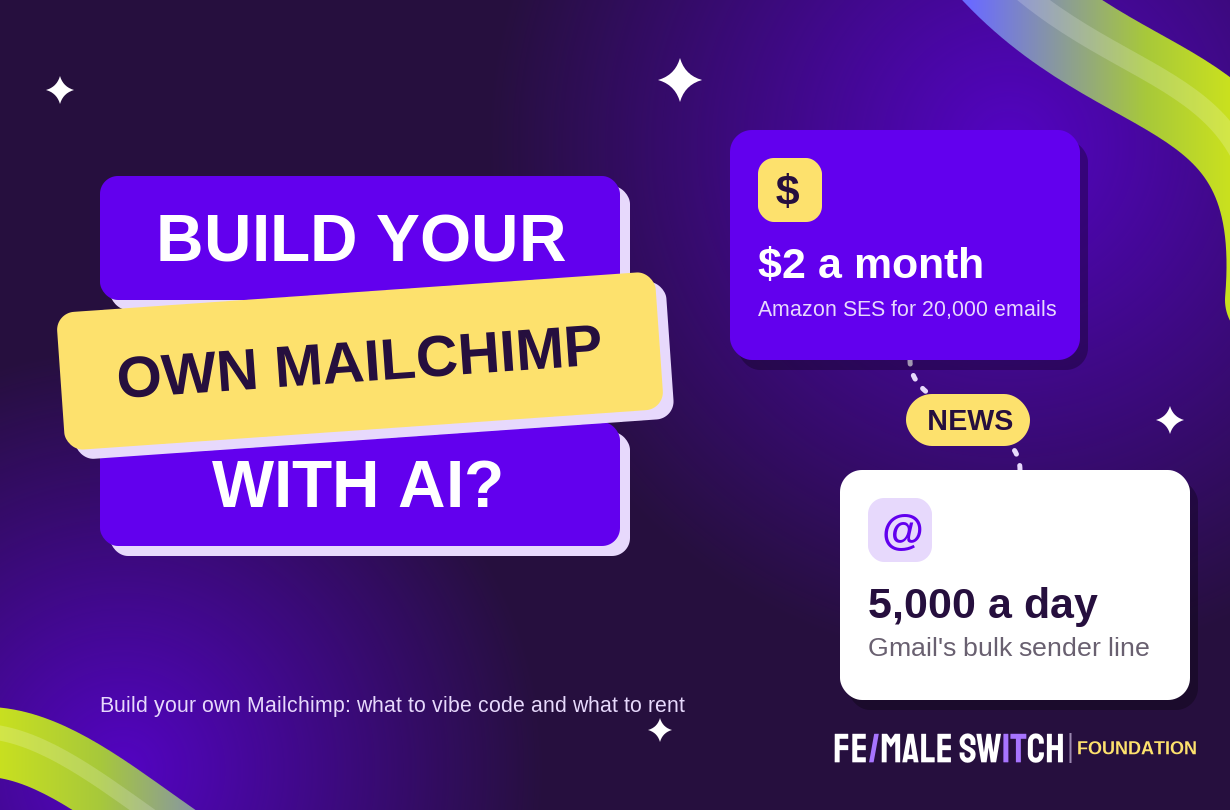
TL;DR: Should you build your own Mailchimp with an AI coding agent?
You can build your own Mailchimp in 2026, and half of it is worth building. Vibe code the parts you see: editor, lists, segments, automations and sign-up forms. Rent the sending from Amazon SES, Postmark or Resend, because deliverability is the hard part. Keep your list and consent records in your own database. At 5,000 subscribers and four newsletters a month, SES charges $2 to $3.20 for the sending. Your hours are the real price, and for most small senders a cheap hosted tool still wins.
Here is what happened with Mailchimp and Bending Spoons, on our sister site MeanCEO. On 19 November 2026 Intuit agreed to sell Mailchimp to Bending Spoons for about $3.68 billion, with closing expected in early 2027; Intuit's release says nothing about changes for customers. Our question here: should a bootstrapped founder vibe code her own email marketing tool instead of renting one?
Vibe coding means describing what you want to an AI coding agent, such as Codex, Claude Code or Cursor, and letting it write the code. In a self-hosted newsletter, the list, forms and campaign tool run on your own server or app, and a sending service delivers the mail.
Should a bootstrapped founder build her own Mailchimp with AI?
Violetta Bonenkamp's view, as a serial founder who bootstraps: build the parts you see if you want to, rent the sending, and own your data. Editors, list screens and forms are ordinary web software, and AI coding agents write that well in 2026. Inbox placement is a different trade: it depends on the reputation of the servers and domains your mail leaves from, on DNS authentication and on how fast you act on bounces and complaints. Amazon, Postmark and Resend run that machinery for cents per thousand emails.
Owning the data matters most when a tool changes hands. With contacts, consent records and unsubscribes in your own database or CRM, switching senders means changing one API connection. MeanCEO looked at the wider question in its piece on which SaaS tools survive the AI agent era.
What does a Mailchimp clone need?
Why is deliverability the hard part of a self-hosted newsletter?
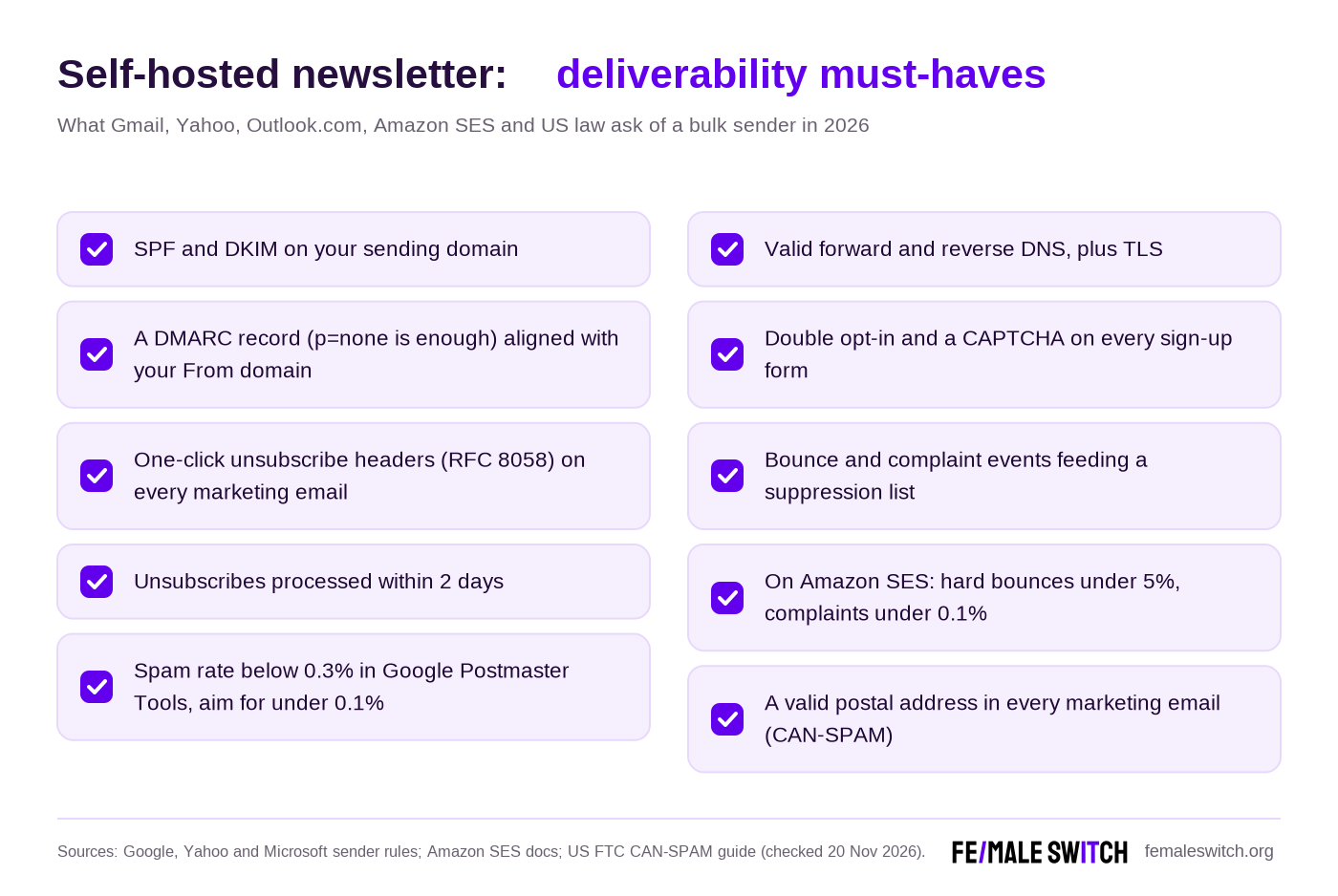
Google's sender guidelines ask anyone sending about 5,000 or more messages a day to personal Gmail accounts for SPF, DKIM and DMARC (DNS records that prove a message comes from your domain), one-click unsubscribe under RFC 8058 and a spam rate below 0.3%. Google's sender FAQ adds that you stay a bulk sender for good once you cross that line, and that "Starting November 2025, Gmail is ramping up its enforcement on non-compliant traffic", with temporary and permanent rejections.
Yahoo's sender page is the strictest on timing: "Honor unsubscribes within 2 days". Microsoft's Outlook.com rules send failing mail from high-volume domains to Junk since 5 May 2025, with rejection to follow at a date still to be announced.
Amazon SES adds its own guardrails. Its reputation documentation puts an account under review at a 5% bounce rate or a 0.1% complaint rate and can pause sending at 10% or 0.5%. New accounts start in a sandbox (verified addresses only, 200 messages per 24 hours) until AWS grants production access, with a first answer promised within 96 hours.
How much does an Amazon SES newsletter cost?
Our example: 5,000 subscribers, four newsletters a month, so 20,000 emails, at list prices on 20 November 2026.
- Amazon SES: $0.10 per 1,000 emails à la carte, so $2.00 a month, says the SES pricing page. New accounts start on a bundled plan at $0.16 per 1,000, so $3.20, and can switch to à la carte at any time.
- Postmark: $15 a month for 10,000 emails plus $1.80 per extra 1,000, so about $33 by our maths, per Postmark's pricing.
- Resend: Marketing Pro costs $40 a month for 5,000 contacts with unlimited sends, per Resend's pricing.
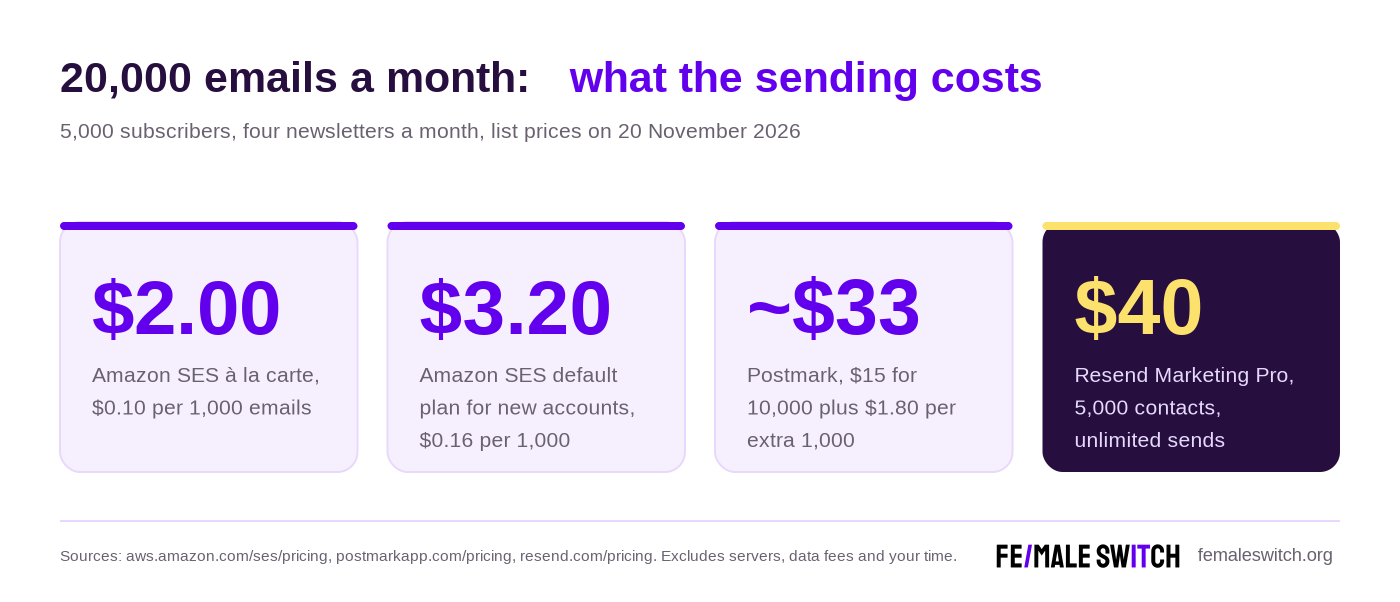
The sending is nearly free, so the bill moves to a server, your domain setup and your hours. Put your current invoice next to these numbers: if you pay far more than $40 a month for 5,000 contacts, a cheaper hosted tool saves money with no build at all.
What are the three realistic setups?
- Switch to a cheap hosted tool. Fastest and safest: the provider handles sending, unsubscribe headers and support. Export your contacts with sign-up dates and sources every month. Our guide to growing your first 1,000 subscribers works with any tool.
- listmonk or Keila with Amazon SES. listmonk is a "self-hosted newsletter, mailing list manager": one program plus PostgreSQL, with double opt-in lists, SQL segments, templates and campaign stats, open source under AGPL-3.0. Keila, made in Germany and also AGPL-licensed, runs in Docker or on its own EU cloud and sends through SES, Postmark or any SMTP server. You run the server and its updates.
- A vibe-coded front end with the SES, Postmark or Resend API. You build lists, forms and automations inside your own product, and your server calls a sending API. It fits founders who already run an app, and it asks the most of you.
For setup 1, we compared prices, free plans and import tools in our guide to Mailchimp alternatives, and the track record behind the sale is in our look at Bending Spoons acquisitions.
What do GDPR, ePrivacy and CAN-SPAM ask of a homemade newsletter?
- GDPR Article 7: you must be able to prove consent, and "It shall be as easy to withdraw as to give consent." Store who signed up, when, on which form and what text they saw.
- GDPR Article 17: the right to erasure. Build a delete that really deletes.
- ePrivacy Directive, Article 13: marketing email in the EU needs prior consent. Soft opt-in covers your own customers for your own similar products, if they can object at sign-up and in every message.
- CAN-SPAM (US): the FTC's guide asks for a valid postal address and an opt-out honoured within 10 business days, with no exception for B2B email.
These duties stay with you whoever writes the code. Our GDPR guide for European startups covers the rest.
How do you vibe code email marketing, step by step?
Here is the build plan for setup 3, with the instructions we would give an AI coding agent. One step per session, tested before the next.
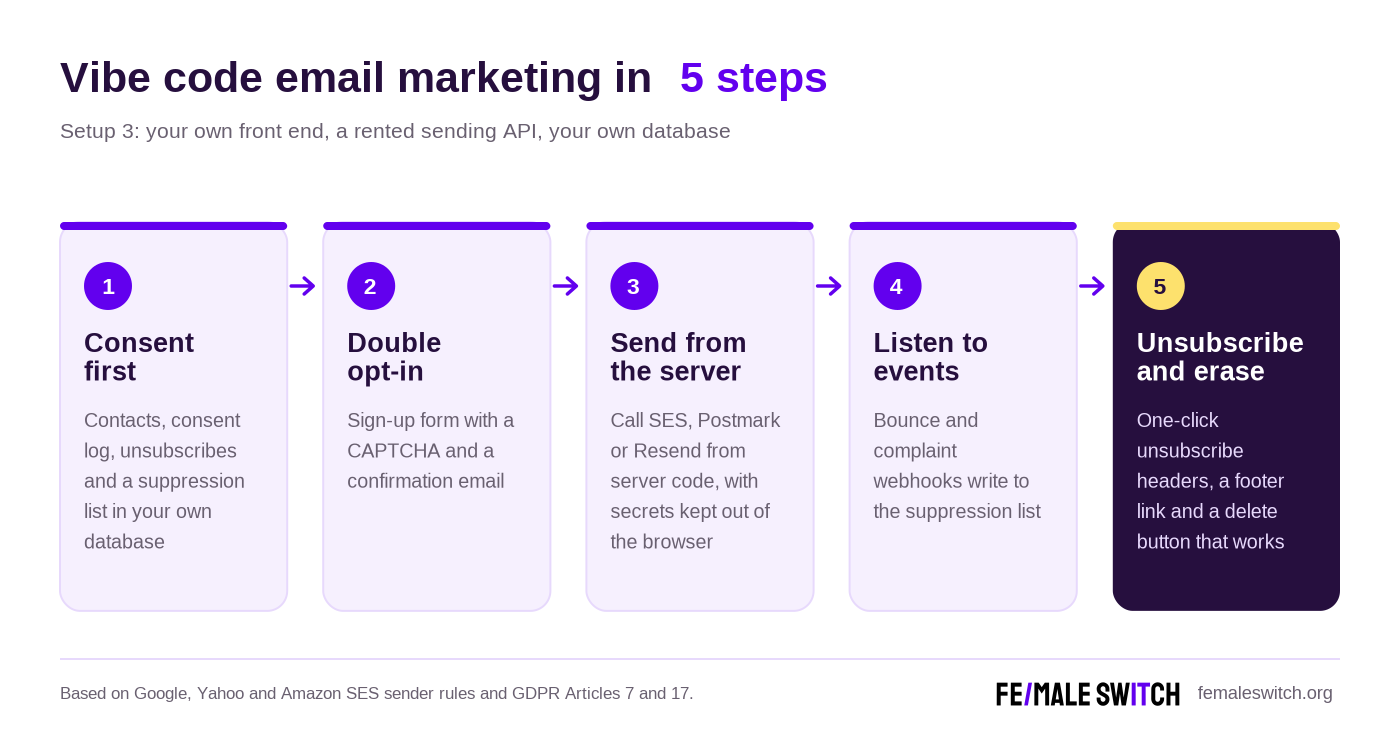
- Spec and schema. "Propose a PostgreSQL schema for contacts, lists, consent events, sends, unsubscribes and a suppression list. No code yet."
- Consent log. "Every sign-up, confirmation and unsubscribe writes an event row with timestamp, form and consent text. Rows are never edited."
- Double opt-in. "Sign-up form with a CAPTCHA and a confirmation email with an expiring link. Only confirmed contacts get campaigns." Amazon SES recommends both against fake sign-ups.
- Secrets on the server. "Call the sending API only from server code, read credentials from environment variables, and fail the build if a secret appears in front-end code or the repository."
- Bounces and complaints. "Receive bounce and complaint webhooks, verify their signature, add hard bounces and complaints to the suppression list, and check it before every send."
- One-click unsubscribe. "Add List-Unsubscribe and List-Unsubscribe-Post headers per RFC 8058, an HTTPS endpoint that works without a login, a footer link and our postal address."
- Erasure and export. "Add a delete that erases a contact everywhere and a CSV export with consent history."
- Then the editor. Plain HTML templates and one welcome email first.
- Go live slowly. Test in the SES sandbox, send first to your most active readers, and check Google Postmaster Tools and the SES reputation page after every campaign.
What did moving femaleswitch.app off Bubble teach us?
In October 2026 we moved femaleswitch.app from Bubble to WordPress, kept all 3,480 URLs and rebuilt our AI tools as our own plugin, written with Codex. Next to the code, our hours went into listing every page and workflow, testing, and releasing pages to Google in stages. Email leaves even less room for error, because a broken send lands in thousands of inboxes at once. Put the edge cases, tests and rollback first. We compared the AI app builders in our look at Lovable, Replit and Base44 after Bubble.
What are the fair arguments against building your own Mailchimp?
- Time. Every hour on email plumbing is an hour away from sales. Compare honestly, as in our cost comparison of no-code and hiring developers.
- Maintenance. Gmail tightened enforcement in November 2025 and Outlook.com started its rules in May 2025. A hosted tool follows such changes for you.
- Compliance. Consent records, erasure and the postal address become your code and your risk. Hosted tools ship them ready made.
- Support. When a campaign sticks at 2 a.m., nobody answers but you.
- Small lists. Resend's marketing plan is free up to 1,000 contacts. Below a few thousand contacts, a hosted tool wins for almost everyone.
What does this mean for you?
- Export your list today, with sign-up dates, sources and unsubscribes.
- Check SPF, DKIM and DMARC on your sending domain; the rules apply on any tool.
- Do the maths: your invoice against $2 to $40 a month for 20,000 emails.
- Pick a setup: hosted for zero maintenance, listmonk or Keila if you can run a server, vibe-coded if email belongs inside your product.
- If you build, start with consent and suppression, and keep the sending rented.
Building your first startup on a budget?
The Fe/male Switch startup game takes you from idea to first paying customers in weekly quests, with an AI co-founder and a community of founders.
👉 Start the game
FAQ: build your own Mailchimp
Can I build my own Mailchimp with an AI coding agent?
Yes for the editor, lists, segments, automations and forms. Rent the sending from Amazon SES, Postmark or Resend, and keep contacts and consent records in your own database.
How much does an Amazon SES newsletter cost?
$0.10 per 1,000 emails à la carte or $0.16 on the bundled plan new accounts start on, so $2.00 to $3.20 for 20,000 emails a month, before servers and your time.
What is the best self-hosted newsletter tool?
listmonk and Keila, both open source under the AGPL. Both send through Amazon SES or any SMTP service.
Do I need DMARC for my newsletter?
Yes if you send about 5,000 or more emails a day to Gmail, Yahoo or Outlook.com users: all three ask for SPF, DKIM and DMARC of at least p=none.
Does GDPR require double opt-in?
GDPR asks you to prove consent and leaves the method to you. Double opt-in gives you a timestamped record, and Amazon SES recommends it.
What happens to my Mailchimp account after the Bending Spoons sale?
Intuit expects the deal to close in early 2027, and its release says nothing about changes for customers. Export your list and consent data now.
